Welcome to the Durham Self Taught Photography Guide!
Introduction
You have just purchased your very first camera. Now, where do you start? DSLR cameras are covered in different buttons and filled with various commands. Using a DSLR may be confusing at first but once you get started, taking photos will become a breeze! It is important that you learn the individual aspects of using a DSLR first to craft a beautifully composed image. Let’s get started with the Durham Self Taught Photography Guide! Put your camera in its “manual” mode and let’s go over our first lesson on aperture, shutter speed and exposure.
Aperture
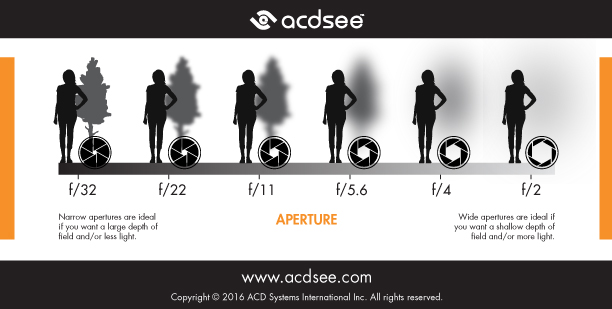
Your aperture represents how “focused” you want your image to be. The larger the aperture number, the less blur it will have, and the background will be sharper (narrow depth-of-field). If you prefer to shoot landscape photos, a larger aperture number is the best (e.g., f/22). In contrast, if you prefer to shoot up-close, portraits, or more macro-like images then a smaller aperture number is better (e.g., f/8 or smaller). The smaller the aperture, the more blur it will have, and the background will be more blurry (shallow depth-of-field). The aperture mostly depends on how much blur in the background you want for your image and the subject of your photo.
Shutter Speed
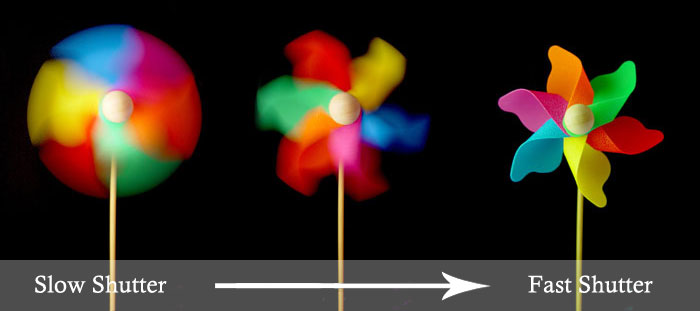
The shutter speed is how fast your shutter is closing when you press the button. Lower shutter speeds will leave the shutter open for longer, and it lets more light into the camera. However it increases motion blur. Therefore, if you are trying to capture a high-speed object, DO NOT have a slow shutter speed because the object will appear very blurry in the photo. Also, keep in mind that a shutter speed below 1/60th of a second will result in camera shake from your hands. You will need a tripod if you are operating at that 1/60th of a second or below. Furthermore, higher shutter speeds snap the image a lot quicker. Higher shutter speeds can freeze people or nature in motion. At high shutter speeds (above 1/60th of a second) you can use the camera without a tripod.
Exposure
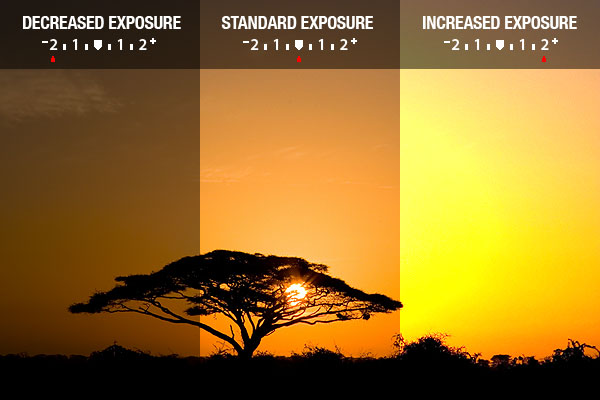
Your exposure appears as the little line on your camera screen, with a plus and a minus on each side. Ideally, you want to have your exposure in the middle, and you should adjust the shutter speed accordingly to achieve this. If the line extends to the plus-side, the picture will appear brighter overall. Whereas, if the line extends to the minus-side it will appear darker overall. Although you want your exposure in the middle, there can be some exceptions. If you think your image looks too dark or too light, you can always move it left or right a couple of notches by adjusting the shutter speed.
Putting It All Together: 5-Steps For Manual Operation
- Set your camera in its “manual” mode. Typically manual mode is represented as an “M” on the camera’s dial.
- Select your aperture based on the subject of your photo (landscape or up-close).
- Set your shutter speed.
- Balance the exposure (aim for the middle!); you may need to lower or raise your shutter speed depending on the aperture and the amount of light you have.
- Take the photo and evaluate. Is it too light, too dark or too blurry? Make adjustments accordingly.
Durham Self Taught Photography Guide: Lesson One Complete!
You have successfully learned the first lesson of the Durham Self Taught Photography Guide and know how to use aperture, shutter speed, exposure to take an image in manual mode! The most important thing is to continually keep practicing and playing with the camera controls until you are comfortable. Stay tuned for new lessons coming soon! Also, if you are looking to learn more, Nikon has short videos and tips to help you constantly improve. Check them out!
Realize that photography is not your thing? There are so many other subjects to read and learn about on our Digital Marketing Testing Site. Here are some suggestions!